Top Gaming Tablets 2026 – Guide to the Best Gaming Tablets
Looking for a tablet that can handle your favorite games without paying for more performance than you need? The best gaming tablet depends on what you play. A tablet for Roblox, Minecraft or puzzle games does not need the same processing power as one intended for demanding 3D games at high graphics settings.
In this guide, we explain how to choose a gaming tablet in South Africa, what matters beyond the advertised specifications, and which Samsung, Lenovo and Apple ranges are worth comparing. You can also browse PC International’s tablets for sale in South Africa to compare current products and prices.
Understanding Gaming Tablets
Here is a practical starting point before you compare individual models:
Casual games and children’s games: An affordable Android tablet may be all you need. Prioritise reliable software, enough storage and a comfortable screen.
Everyday gaming and good value: Consider a well-equipped Lenovo Idea Tab or a Samsung Galaxy Tab FE-series model. Check the processor and memory rather than relying on the product name alone.
More demanding Android games: Compare higher-end Samsung Galaxy Tab S-series models, particularly their graphics performance, cooling, display and storage options.
Apple games and long-term versatility: The iPad Air is a strong starting point, while the iPad Pro adds premium display features and additional performance headroom.
Windows PC games: Look at a Windows gaming laptop or a suitable Windows device. An Android tablet or iPad cannot natively run the full Windows game library.
Important: These are ranges to investigate, not guarantees that every model in a range will run every game at a particular frame rate. Always check the requirements of the games you want to play.
Samsung Galaxy Tab: options for casual and demanding Android gaming
Samsung offers tablets at several performance levels. Galaxy Tab A models tend to make more sense for everyday use and lighter games, while FE models sit between entry-level and flagship options. The premium Galaxy Tab S range is worth considering when graphics performance, display quality and multitasking matter most.
That distinction is important: a large screen or a recent model number does not automatically make a tablet powerful enough for demanding games. Compare the actual chipset, RAM, refresh rate and storage on the model you are considering. Browse the Samsung tablet range for the current selection.
Lenovo tablets: good-value choices for everyday gaming
If you want a tablet for gaming, videos, browsing and study without automatically buying a premium flagship, Lenovo is worth a look. Some Idea Tab configurations offer generous storage and memory for the price, making them practical for a mix of lighter and moderately demanding games.
Look carefully at the processor: two Lenovo tablets with similar screen sizes and RAM can deliver very different gaming results. A sharp display is pleasant to use, but it will not compensate for an underpowered graphics chip. Explore the current Lenovo tablets and compare the specifications of individual models.
Apple’s iPad range is another strong option for mobile games. The standard iPad suits many everyday titles, the iPad Air provides extra performance headroom, and the iPad Pro is aimed at people who also value its high-end display and other professional features.
The most expensive iPad is not automatically the best purchase for every gamer. An iPad Air may already handle the games you enjoy, leaving room in your budget for more storage or accessories. Also remember that game availability and controller support can differ between iPadOS and Android. Compare the available iPad models before deciding.
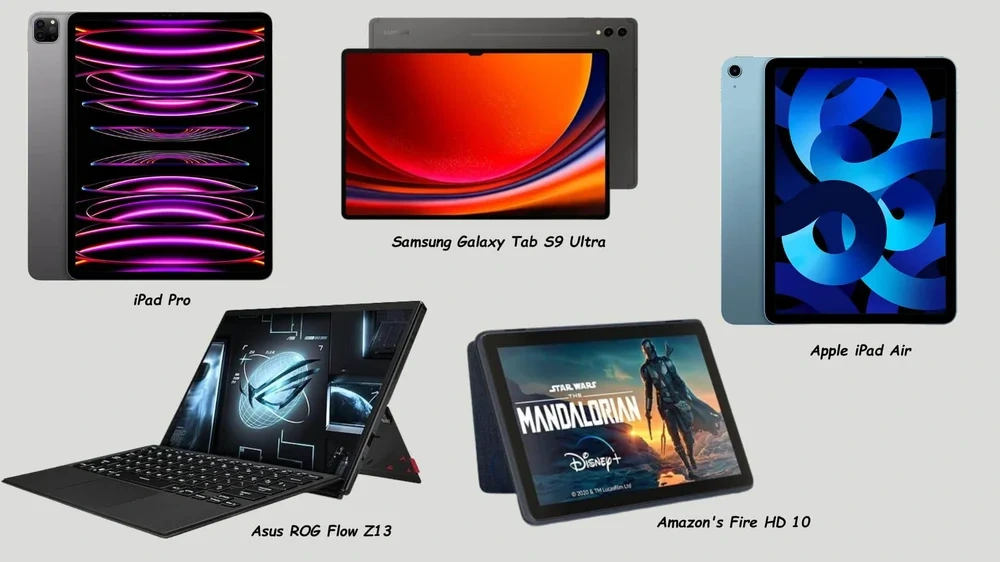
Premium gaming tablets in 2026, such as the ASUS ROG Flow Z13 and the Samsung Galaxy Tab S9, will potentially come with Windows 11 and a whopping 16GB of RAM. Their compatibility with cloud gaming services like Amazon Luna makes them even more compelling for gaming enthusiasts.
The Samsung Galaxy Tab S9 Ultra offers a top-tier gaming experience that’s hard to match. It’s powered by Android 13 and the Snapdragon 8 Gen 2 which, combined with its enormous 16GB of RAM, enables high-speed, lag-free gaming. This high-end tablet is also known for its large, high-resolution display that presents games in stunning detail.
For Apple enthusiasts, the iPad Pro and the latest iPad Air are fantastic options. The iPad Pro, boasting a powerful A13 Bionic chip, is a great pick for Apple users looking for an impressive gaming tablet. The iPad Air, while not as powerful as the Pro, still offers a solid gaming experience.
Enhancing Your Gaming Experience: Specifications to look at
1. Processor and graphics performance
The processor and its built-in graphics hardware have a major effect on how smoothly games run. A newer tablet is not necessarily faster than an older premium model. If gaming is your priority, compare trustworthy performance tests for the exact chipset and, where possible, gameplay results for the titles you play.
2. RAM: how much do you really need?
For lighter games, a tablet with 4GB of RAM can be sufficient. Around 6GB to 8GB gives more breathing room for multitasking and a wider range of games, while higher-end configurations may offer 12GB or more. RAM alone does not determine gaming speed: an efficient chip with less RAM may still outperform a weaker chip with more.
3. Screen size and refresh rate
An 8- to 9-inch tablet is easier to hold for longer periods, while an 11-inch screen gives more space for on-screen controls. Larger tablets are excellent for desk or controller use but can become uncomfortable to hold. A 90Hz or 120Hz display can look smoother than 60Hz, although the game, settings and hardware must also support the higher frame rate. A 120Hz screen does not guarantee 120 frames per second.
4. Storage for games and updates
Games, downloadable content and updates can consume considerable space. A 64GB tablet may be limiting if you install several large titles. Consider 128GB as a practical starting point and 256GB if you keep many games installed. Some Android tablets support microSD cards, but not every game can be moved to external storage. Check the usable storage and expansion options on the exact device.
5. Battery Life Considerations for Gaming Tablets
Manufacturer battery estimates often describe video playback or general use rather than intensive gaming. Graphics-heavy games, high brightness and cellular connectivity can drain a battery considerably faster. Also look for reviews that discuss sustained performance: a tablet may run a game well at first but slow down as it heats up.
6. Wi-Fi, mobile data and controllers
For online multiplayer games, a stable connection and low latency matter more than headline download speed. A Wi-Fi-only tablet is often enough for home gaming; LTE or 5G is useful if you regularly play away from Wi-Fi, but you should check local coverage and data costs. If you prefer a Bluetooth controller, confirm that both your chosen game and tablet support it.
Can a budget tablet be good for gaming?
Yes, provided your expectations match the hardware. An affordable tablet may be an excellent choice for puzzle games, turn-based games, educational titles and less demanding multiplayer games. It may struggle with high-end 3D graphics, maximum visual settings or sustained high frame rates.
Do not compare price alone. Check how much storage is available after the operating system is installed, whether the device still receives security updates, and how well it runs the games that matter to you. The broader tablet collection is useful for finding alternatives across different budgets.
Check your games first: Look at the current Android or iPadOS app listing for compatibility and minimum requirements.
Compare the exact model: Wi-Fi and cellular versions, memory configurations and regional variants can differ.
Think about long-term value: Adequate storage, software support and a reliable warranty can matter more than chasing the newest release.
Consider the total cost: A controller, protective case, charger or mobile data plan may add to the purchase price.
Review current availability: Product cards and prices can change as stock changes, so use the latest specifications on each product page before ordering.
Exploring Cloud Gaming on Tablets
While the 9-inch iPad and top Android devices are powerful tablets available for gaming, the real draw lies in the enhanced gaming performance and the immersive experience that cloud gaming platforms bring to these devices.
Through employing the flexibility of cloud computing, gaming has overcome the confines of hardware-dependent operations, proposing a heavenly landscape for amazing gaming experiences that were once a remote dream for tablet users.
Delving into the details of this tech marvel uncovers systems of servers and internet speed thresholds that intertwine to deliver seamless, high-quality gaming on tablets. This evolution signifies the transition of cloud gaming from an innovative concept to a mainstream gaming platform.
Cloud gaming may allow supported games to be streamed to some tablets without running them locally. However, service availability in South Africa, supported games, subscriptions, controller requirements and internet quality must all be checked before you buy a tablet for that purpose.
Android vs iPad vs Windows for gaming
Android tablets offer a broad choice of prices, sizes and manufacturers. Game performance and software support vary significantly by model.
iPads offer access to games designed for iPadOS and a wide choice of accessories. Not every Android game is available on iPadOS, or vice versa.
Windows tablets and 2-in-1 devices can run compatible desktop games, but they are a different category of device. Gaming performance, weight, battery life and cooling vary; a full gaming laptop may be a better fit for demanding PC titles.
Top Gaming Tablets of 2027
Looking for the best gaming tablets in 2027? Whether you enjoy competitive mobile games, graphically demanding adventures or casual gaming, today’s tablets offer impressive performance across different budgets. Here are six standout models worth considering, based on their specifications and gaming capabilities.
1. REDMAGIC Astra 2 – Best for Serious Android Gaming
The REDMAGIC Astra 2 is designed specifically for mobile gaming. Featuring the Snapdragon 8 Elite Gen 5 processor, a compact 9.06-inch OLED display with a refresh rate of up to 185Hz, and advanced cooling technology, it is particularly appealing to competitive gamers. Its compact size also makes it easier to hold during extended gaming sessions.
Best for: Competitive Android gaming, demanding mobile titles and players who prioritise performance and responsiveness.
2. Apple iPad Pro M5 – Best Premium Gaming Tablet
Apple’s iPad Pro M5 combines powerful graphics processing with an exceptional OLED display. Available in 11-inch and 13-inch sizes, it features Apple’s M5 chip, hardware-accelerated ray tracing and ProMotion technology supporting refresh rates up to 120Hz. It is a strong choice for demanding iPad games while also offering excellent capabilities for creative work and entertainment.
Best for: Premium iPad gaming, high-quality visuals and users who want a powerful all-round tablet.
3. Lenovo Legion Tab Gen 5 – Best Compact Gaming Tablet
The Lenovo Legion Tab Gen 5 packs flagship performance into a portable 8.8-inch design. Powered by the Snapdragon 8 Elite Gen 5 and featuring a 165Hz 3K display, it offers an excellent combination of portability and gaming-focused specifications. Its smaller screen makes it particularly suitable for handheld gaming compared with larger premium tablets.
Best for: Portable Android gaming, fast-paced games and users who prefer smaller tablets.
The Samsung Galaxy Tab S12 Ultra delivers an immersive gaming experience with its enormous 14.6-inch Dynamic AMOLED 2X display and 120Hz refresh rate. Powered by the MediaTek Dimensity 9500 processor, it offers high-end performance for demanding Android games. Its large screen is especially appealing for strategy games, adventure titles and gaming with an external controller.
Best for: Large-screen Android gaming, immersive visuals and gamers who also use their tablet for productivity.
Explore PC International’s Samsung tablet range to compare available models and prices.
5. Apple iPad Air M4 – Best Balance of Performance and Value
The iPad Air M4 provides substantial processing power without the premium price of the iPad Pro. Its Apple M4 chip handles a wide variety of demanding games, while the 11-inch and 13-inch display options give buyers flexibility. Although its 60Hz display lacks the Pro’s higher refresh rate, it remains an attractive option for gaming, studying and entertainment.
Best for: Gamers looking for powerful Apple hardware without paying for the iPad Pro’s premium display features.
6. Samsung Galaxy Tab S10 FE – Best for Casual Gaming and Everyday Use
Not every game requires flagship hardware. The Samsung Galaxy Tab S10 FE features an Exynos 1580 processor, a 10.9-inch display with a 90Hz refresh rate and configurations offering 8GB or 12GB of RAM. It is worth considering for popular games such as Roblox, Minecraft and other casual titles, while also serving as a practical tablet for schoolwork and entertainment. More demanding games may require reduced graphics settings.
Best for: Casual gaming, students and families looking for a versatile mid-range tablet.
Remember that newer does not automatically mean better value. Previous-generation flagship tablets can still deliver excellent gaming performance, particularly when discounted. Before buying, compare the processor, graphics capabilities, display refresh rate and storage rather than focusing only on the model year.
You can explore PC International’s tablets for sale to compare the current selection and find a tablet suited to your gaming needs and budget.
Frequently asked questions about gaming tablets
Is 4GB of RAM enough for gaming on a tablet?
It can be enough for casual or older games, but modern graphics-intensive titles may need more memory. Check the specific game requirements and the tablet’s processor as well as its RAM.
Is 64GB enough storage for a gaming tablet?
64GB can work if you install only a few small games. For a larger game library, 128GB or 256GB is usually more practical, especially after accounting for the operating system and updates.
Do I need a 120Hz tablet for gaming?
No. A higher refresh rate can make supported games feel smoother, but a good 60Hz tablet is still suitable for many players. Game frame-rate limits and chipset performance are just as important.
Can I connect a controller to a gaming tablet?
Many tablets support Bluetooth controllers, but compatibility varies by controller, operating system and game. Check that your favourite titles support external controllers before buying one.
Can an Android tablet or iPad play Windows PC games?
Not directly in the same way as a Windows PC. Some games have separate mobile versions, while certain streaming or remote-play services may offer another route. Service availability, licensing, connection quality and game compatibility all matter.
Find a gaming tablet that fits how you play
There is no single best gaming tablet for everyone. If you mainly play casual games, an affordable Android model could be the sensible purchase. If you want more demanding titles and a premium screen, compare higher-end Samsung Galaxy Tab models or an iPad Air or Pro. For Windows PC games, consider whether a gaming laptop would serve you better.
Ready to compare? Explore PC International’s tablet range, review each model’s latest specifications and choose based on the games you actually play.
Select the fields to be shown. Others will be hidden. Drag and drop to rearrange the order.