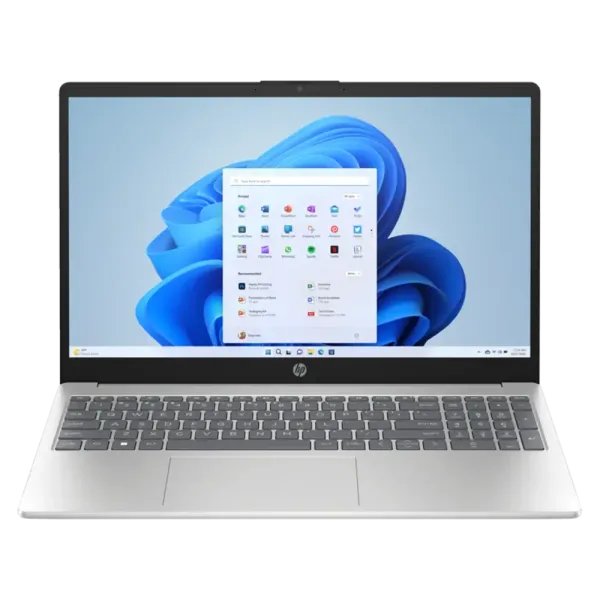
Affordable HP i5 Laptop High Performance Advanced Features
HP Core i5 laptops have long been a popular middle ground for buyers who want more performance than an entry-level laptop without moving into the price range of higher-end processors.
They are well suited to everyday business work, studying, web applications, Microsoft Office, video meetings and heavier multitasking. Depending on the model, HP combines Core i5 processors with different amounts of RAM, SSD storage, screen sizes and business features, so there is no single specification that defines an “HP i5 laptop”.
Intel’s naming has also started to change. Alongside familiar Core i5 processors such as the i5-1235U and i5-1334U, newer laptops are increasingly appearing with names such as Intel Core 5 120U. We explain the difference below so you know what to look for when comparing current models.
You can browse the latest HP laptops or compare our complete range of laptops if you want to consider other brands as well.
Understanding the HP Core i5 Laptop
An HP Core i5 laptop is not one specific machine. HP uses Intel Core i5 processors across a number of notebook families, from affordable everyday systems to business-focused ProBook and EliteBook models.
The right configuration depends on what you intend to do with it.
For general office work and studying, an 8GB Core i5 laptop with SSD storage can provide a responsive everyday experience. If you regularly keep many applications and browser tabs open, work with large spreadsheets or want more headroom for future software, 16GB RAM is often a better choice.
Storage also varies. A 256GB SSD may be enough for cloud-based users, while 512GB provides considerably more room for applications and local files.
The important point is to compare the complete laptop rather than assuming every Core i5 model has the same RAM, SSD, display, warranty or operating system.
Intel Core i5 processors have traditionally occupied the mainstream part of Intel’s laptop range, offering a useful balance between performance, efficiency and price.
That makes them a strong fit for users who need more than basic browsing and document editing but do not necessarily need a high-end workstation processor.
A modern Core i5 laptop can comfortably handle workloads such as:
Microsoft Word, Excel and PowerPoint
Multiple browser tabs and web applications
Video meetings
Accounting and business software
Streaming and media consumption
Light photo editing
General development and productivity work
Actual performance still depends on the specific processor model. An i5-1235U, i5-1334U and i5-13420H are all Core i5 processors, but they do not have identical performance characteristics or power requirements.
Feature
Why It Matters
Core and thread configuration
Affects how well the processor handles multiple tasks
Processor generation and model
Newer or higher-performance models may offer different capabilities
Power class
Influences performance, heat and battery behaviour
RAM
Determines how comfortably several applications can remain open
SSD storage
Improves startup, application and file-loading times
The Core i5 name is therefore a useful starting point, but the complete model number and laptop configuration matter just as much.
Intel Core i5 vs Intel Core 5: What Is the Difference?
If you are shopping for a new HP laptop, you may now see both Intel Core i5 and Intel Core 5 processors.
Intel changed its processor branding, and newer mainstream processors may use names such as Core 5 120U instead of the familiar Core i5 naming convention.
Core 5 should not be treated as nothing more than an i5 badge with the letter removed. Different processor generations and models have their own specifications, so the complete processor name still matters.
For buyers, however, the practical takeaway is simple: if you would traditionally have considered a Core i5 laptop, a modern Core 5 HP laptop belongs in the same general comparison.
You therefore do not need to reject a newer HP simply because its specification says “Core 5” instead of “Core i5”. Compare its processor model, RAM, storage, display and overall laptop features against the alternatives.
HP uses mainstream Intel processors across several laptop families, and the range itself can matter just as much as the processor.
HP 15 and HP 250
These models generally focus on practical everyday computing and value. They can be a good fit for home users, students and businesses that need dependable laptops without unnecessary premium features.
HP ProBook
The HP ProBook range is aimed more directly at business users. Depending on the model, you may find business-focused features, Windows 11 Pro, different warranty options and additional connectivity.
HP EliteBook
EliteBook systems move further into HP’s premium business range, with greater emphasis on portability, build quality and business features.
The processor alone does not tell you which range is best. A less expensive HP 15 with a Core i5 may make more sense for a home user, while a company may prefer a ProBook even when both laptops offer similar processor performance.
Browse the complete HP laptops range to compare the different families currently available.
How Much RAM Does an HP Core i5 Laptop Need?
RAM determines how much active work your laptop can comfortably keep in memory at the same time.
For everyday Windows use, 8GB RAM remains a practical starting point. It can handle browsing, documents, email, video calls and normal office applications.
For heavier multitasking, 16GB RAM is increasingly worthwhile. It gives you more room for large spreadsheets, many browser tabs and several applications running simultaneously.
Users working with more demanding creative software, development tools or large datasets may benefit from even more memory, depending on the workload.
RAM
Best Suited To
8GB
Everyday work, studying, browsing and office applications
16GB
Heavier multitasking, business use and more demanding applications
32GB+
Specialist workloads where the software can make use of additional memory
The processor and RAM work together, so pairing a capable Core i5 or Core 5 processor with too little memory can still limit the overall experience.
Choosing the Right Display
Full HD remains a good baseline for an everyday laptop display.
A resolution of 1920 × 1080 provides enough detail for documents, web browsing, spreadsheets, streaming and normal business use. Newer business laptops may also use taller resolutions such as 1920 × 1200, which provide additional vertical working space.
Screen size is a separate consideration.
A 14-inch laptop is generally easier to carry, while 15.6-inch and 16-inch models provide more physical working space. Larger business laptops may also include a dedicated numeric keypad, which can be useful for frequent spreadsheet or accounting work.
Do not judge the display by resolution alone. Brightness, panel quality, colour reproduction, refresh rate and touch support can also differ between models.
Battery Life and Portability
A Core i5 or Core 5 processor does not determine battery life on its own.
Battery capacity, screen brightness, display size, processor power settings, wireless use and the applications you run all affect how long a laptop can operate between charges.
If the laptop will regularly travel between home, university, client sites or meetings, compare the weight and battery specification of the individual models you are considering.
A 14-inch business laptop may be easier to carry throughout the day, while a larger 15.6-inch or 16-inch machine can provide a more comfortable workspace when portability is less important.
The best option depends on whether your priority is mobility, screen space or a balance between the two.
Key Features of the HP ProBook 450 G9
The Intel® Core™ i5 processor in the HP ProBook 450 G9 ensures a powerful computing experience and high-end graphics.
The laptop’s robust 16GB RAM and 512GB SSD contribute to smooth multitasking, faster loading times, and efficient power management.
HP ProBook 450 G9 is available for online purchase, offering convenience to customers in South Africa and beyond.
The laptop comes with a 3-year warranty, providing customers with a sense of security about their investment.
Who Should Buy an HP Core i5 or Core 5 Laptop?
An HP Core i5 or Core 5 laptop is a strong fit for users who need more performance than a basic entry-level machine without moving into a premium processor class.
It is particularly suitable for:
Students who multitask between research, documents and online classes
Office users working with spreadsheets, browser applications and video meetings
Small businesses that need dependable general-purpose laptops
Home users who want a machine with enough performance to remain useful for several years
Professionals who need solid everyday productivity without workstation-level hardware
These processors can also handle lighter photo editing and other moderately demanding tasks, although performance will depend on the exact processor, memory and cooling design.
For demanding 3D work, professional video editing, engineering applications or modern gaming, the graphics hardware and overall laptop configuration become much more important than the Core i5 name alone.
What Affects the Price of an HP Core i5 Laptop?
Two HP laptops with Core i5 processors can have very different prices because the processor is only one part of the specification.
The price can be influenced by:
Processor generation and model
RAM capacity
SSD capacity
Display size and resolution
Windows 11 Home or Windows 11 Pro
Build quality and HP product range
Touchscreen or convertible design
Warranty type and duration
Business features and connectivity
This is why comparing only the words “Core i5” can be misleading.
If processor choice is your main priority, you can also browse our wider selection of Intel Core i5 laptops across multiple brands.
If you specifically want HP, the HP laptops category is the better starting point.
Check the Warranty Before You Buy
Warranty coverage varies between HP laptop models.
Some systems may include a one-year carry-in warranty, while particular business models can include longer or onsite coverage. The warranty should therefore be checked on the individual product rather than assumed from the processor or HP brand alone.
This can be especially important for business purchases, where onsite support or longer warranty coverage may be worth paying more for.
When comparing two similar HP laptops, include the warranty in the decision alongside the processor, RAM, storage and operating system.
Choosing an HP Laptop Online
When shopping for an HP laptop online, start by deciding what the machine actually needs to do.
For everyday work, an 8GB Core i5 configuration may be perfectly adequate. For heavier multitasking or a laptop expected to remain in service for several years, 16GB RAM can provide more breathing room.
Then compare storage, display size, operating system and warranty.
Requirement
What to Consider
Everyday productivity
Core i5 or Core 5 with 8GB+ RAM
Heavy multitasking
16GB RAM or more
Local file storage
512GB or larger SSD
Frequent travel
14-inch or other lightweight models
Desk-based work
15.6-inch or 16-inch display
Business use
Windows 11 Pro and suitable warranty coverage
The HP laptops range lets you compare these specifications across HP’s current notebook families instead of relying on a single fixed configuration.
Can You Game on an HP Core i5 Laptop?
A Core i5 processor is capable of gaming, but the processor alone does not make a laptop a gaming laptop.
Many mainstream HP Core i5 systems rely on integrated Intel graphics. These are suitable for everyday visual workloads and may run lighter or older games, but they are not a substitute for a dedicated gaming GPU.
For modern games, the graphics processor is usually one of the most important specifications to check.
If gaming is the main reason for buying the laptop, compare our dedicated gaming laptops rather than choosing solely because a notebook has a Core i5 processor.
For general work, productivity and occasional light gaming, however, a mainstream HP Core i5 or Core 5 laptop can still offer a very good balance.
Is an HP Core i5 Laptop Worth It?
For many buyers, an HP Core i5 laptop remains one of the most practical choices in the middle of the laptop market.
It provides enough processor performance for serious everyday productivity without automatically moving into the cost of higher-end CPUs.
At the same time, buyers should now be aware of Intel’s newer Core 5 naming. Current HP ranges can include both traditional Core i5 processors and newer Core 5 models, so it makes sense to compare both when shopping.
The best choice is not determined by the processor badge alone.
Look at the complete specification:
Exact processor model
8GB, 16GB or more RAM
SSD capacity
Display size and resolution
Windows edition
Ports and connectivity
Weight and battery requirements
Warranty coverage
For current HP models, browse our full range of HP laptops.
If you want to compare HP with Lenovo, Dell, Asus, Acer and other manufacturers, browse all our laptop deals.
Select the fields to be shown. Others will be hidden. Drag and drop to rearrange the order.