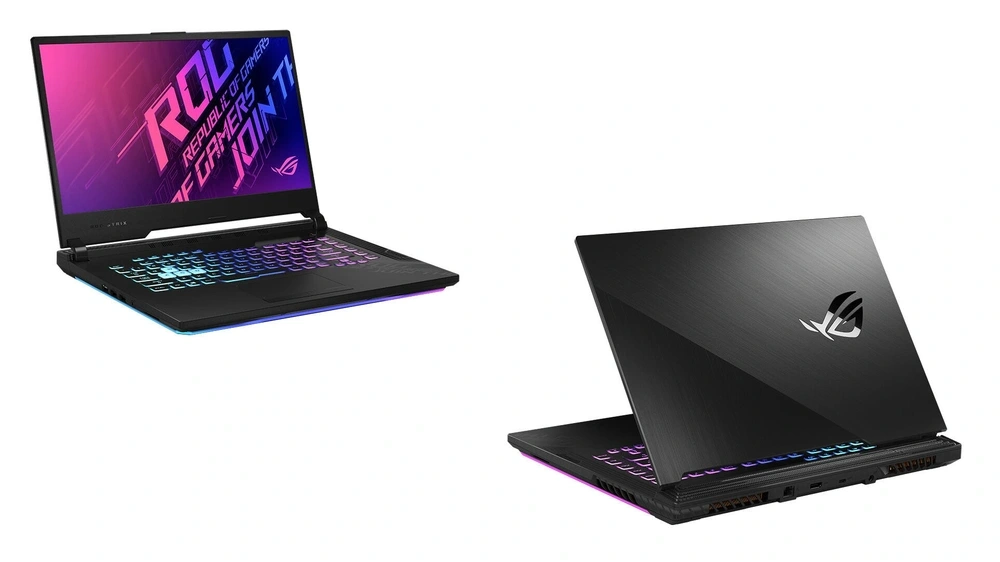
ASUS has several distinct gaming laptop families, and the names can become confusing if you are comparing models for the first time.
TUF Gaming, ROG Strix, Strix SCAR, Zephyrus and Flow are not simply different badges placed on otherwise similar laptops. Each range has a different balance of gaming performance, cooling, portability, display quality, design and price.
A TUF Gaming model may make more sense if you want to put as much of your budget as possible towards the CPU and graphics card. A Zephyrus is aimed at someone who still wants serious gaming hardware but also cares about weight, build quality and portability. Strix moves further towards sustained gaming performance, while Flow takes ASUS gaming hardware into more unusual compact and touchscreen designs.
ASUS also uses both Intel and AMD processors throughout the range, including Core i7, Core Ultra 9, Ryzen 7 and Ryzen 9 configurations.
You can see how these different families currently sit alongside one another in the ASUS gaming selection.
ASUS TUF Gaming vs ROG: What Is the Difference?
The easiest place to start is with the two main ASUS gaming names: TUF Gaming and ROG.
TUF Gaming is generally positioned around performance, durability and value. These laptops still use powerful processors, dedicated NVIDIA graphics and high-refresh displays, but they tend to avoid some of the more expensive materials and premium features found further up the ASUS range.
ROG stands for Republic of Gamers. Rather than being one particular laptop, ROG is the premium gaming brand that contains several different families.
These include:
ROG Strix
ROG Strix SCAR
ROG Zephyrus
ROG Flow
The ROG name therefore does not tell you exactly what type of laptop you are looking at. A Zephyrus and a Strix can both carry the ROG badge while being designed for quite different users.
ASUS Gaming Range
Main Focus
Typical Fit
TUF Gaming
Performance and value
Gaming without paying for every premium extra
ROG Strix
Sustained gaming performance
Enthusiast and competitive gaming
ROG Strix SCAR
Flagship gaming performance
High-end desktop-replacement use
ROG Zephyrus
Performance and portability
Gaming, work and travel
ROG Flow
Compact and flexible designs
Users wanting something different from a conventional gaming laptop
The model family is only the starting point. The exact processor, graphics card, display and cooling system still determine how a particular configuration performs.
ASUS TUF Gaming
TUF Gaming is one of the most recognisable ASUS gaming ranges and covers considerably more than entry-level machines.
Modern TUF models can be configured with powerful Ryzen or Intel processors and current-generation GeForce RTX graphics, so the range stretches from relatively accessible gaming systems to configurations capable of handling demanding modern titles.
The main idea behind TUF is straightforward: concentrate on the hardware and practical features a gamer is likely to use.
That usually means:
Dedicated NVIDIA GeForce RTX graphics
High-refresh displays
Cooling built for sustained gaming loads
Practical connectivity
A more rugged design philosophy
Upgradeable memory or storage on supported models
Less emphasis on making the chassis as thin as possible
TUF Gaming A14
The TUF A14 takes the normal TUF formula and puts it into a considerably more portable 14-inch format.
That makes it an interesting option for somebody who wants a genuine gaming machine but still carries the laptop to university, work or between different locations regularly.
A smaller chassis inevitably gives the cooling system less physical room than a large gaming notebook, so compact models always involve some balance between size, power and thermals.
For many users, however, having a machine that is substantially easier to carry is worth that trade-off.
This Ryzen 7 configuration is a useful example of what the modern TUF range can offer in a smaller form factor: a performance-focused processor, dedicated RTX graphics and a high-resolution 14-inch display without moving into the larger 16-inch gaming-laptop footprint.
TUF Gaming A16
The TUF A16 gives the cooling system and display considerably more room.
The larger chassis suits users who spend more time gaming at a desk and would rather have the additional screen space than minimise weight.
ASUS’s A-series TUF machines are generally associated with AMD processors, although you should always check the specification of the exact model rather than relying entirely on the name.
The current A16 family demonstrates how broad the TUF range has become. Different configurations can use different graphics cards, storage capacities and display resolutions while looking very similar from the outside.
A Ryzen 9 and RTX 5070 configuration moves well beyond the idea that TUF is only for entry-level gaming. It is still positioned differently from ASUS’s premium ROG machines, but the underlying hardware can be extremely capable.
TUF Gaming F16
TUF Gaming F models provide the Intel side of the range.
A TUF F16 typically follows the same practical approach as the A16 but combines it with an Intel processor platform.
This gives buyers the option of choosing between Intel and AMD without necessarily moving into a different type of chassis.
The important point is not that one letter is universally better than another. Compare the individual processor and graphics card because those differences will matter far more in actual games.
What Is ASUS ROG?
Republic of Gamers is ASUS’s premium gaming brand.
ROG machines generally introduce more specialised gaming features than TUF, but there is no single ROG design.
Some ROG laptops are large machines built around maximum sustained performance. Others are slim premium laptops intended to provide gaming power without looking or feeling like a conventional desktop replacement.
This is why it makes more sense to compare Strix vs Zephyrus vs Flow than simply asking whether TUF or ROG is better.
ROG Strix
ROG Strix is the performance-first part of the ROG laptop family.
These laptops are designed around gaming rather than trying to hide the fact that they are gaming machines.
Typical Strix characteristics include:
High-performance processors
Powerful dedicated GPUs
High-refresh displays
Larger cooling systems
Gaming-focused keyboards
More aggressive styling
RGB lighting
Chassis designed around sustained CPU and GPU loads
Strix is a logical step up when gaming performance matters more than minimum size or weight.
ROG Strix G16
The G16 is one of the core Strix models.
Its 16-inch format provides enough room for a substantial cooling system while still remaining more manageable than an 18-inch desktop-replacement laptop.
It is particularly well suited to higher-refresh gaming because Strix configurations often pair fast displays with powerful laptop GPUs.
The Core i7-14650HX configuration is a good example of the difference between TUF and Strix. The focus is not only on having an RTX 5060, but on supporting that hardware with a 2.5K 240Hz display, a larger cooling platform and gaming-oriented chassis.
ROG Strix G18
The G18 follows the same general philosophy but uses an even larger display and chassis.
The additional physical space can be useful for cooling and makes the laptop feel much closer to a portable desktop setup.
It is not the obvious choice for somebody who needs to carry their laptop every day.
For someone who mostly moves the machine between desks and wants as much screen space as possible without using an external monitor, however, the larger format can make sense.
ROG Strix SCAR
Strix SCAR is positioned above the standard Strix range.
This is where ASUS traditionally pushes towards its flagship gaming configurations.
SCAR systems are aimed at users looking for specifications such as:
High-end mobile CPUs
Upper-tier RTX graphics
High-resolution, high-refresh displays
More advanced cooling
Larger memory configurations
Large 16-inch or 18-inch chassis
The difference is not that SCAR runs a completely different type of game. It is about how far the laptop can push demanding games and high-refresh displays before compromises become necessary.
A SCAR can make sense for somebody attempting to replace a powerful gaming desktop with one transportable system.
For most players, however, a standard Strix or well-configured TUF may offer a better balance between price and the performance actually required.
ROG Zephyrus
Zephyrus approaches gaming from a different direction.
Rather than making maximum chassis size part of the solution, ASUS tries to fit powerful gaming hardware into a thinner and more refined laptop.
That makes Zephyrus particularly attractive to people who use the same computer for more than gaming.
A Zephyrus can fit naturally into:
Gaming
University
Content creation
Video editing
Professional work
Travel
Client meetings
The design is generally more restrained than Strix, and premium display technology plays a particularly important role in the range.
ROG Zephyrus G16
The Zephyrus G16 combines a 16-inch display with a chassis that is considerably thinner and lighter than many performance-focused gaming laptops.
Selected models also use OLED displays, giving Zephyrus a different emphasis from the traditional high-refresh IPS gaming panel.
OLED can provide:
Extremely deep blacks
Very high contrast
Fast pixel response
Excellent colour reproduction
Strong image quality for games and creative work
That makes the G16 especially interesting for somebody who wants one laptop for both gaming and visually demanding professional work.
This Core Ultra 9 configuration shows the Zephyrus philosophy well. It combines an RTX 5060 with a 240Hz OLED display in a much thinner chassis than a typical Strix machine.
The compromise is that thinner gaming laptops have less physical room for cooling.
Two laptops can therefore use graphics cards carrying the same RTX name while operating at different power levels and producing different sustained performance.
That is one reason the model range matters alongside the GPU itself.
ROG Zephyrus G14
The G14 applies the same idea to an even smaller chassis.
A 14-inch gaming laptop can be substantially easier to travel with than a 16-inch or 18-inch system while still providing dedicated graphics performance.
The smaller screen and reduced thermal space will not appeal to everyone, but the G14 occupies an unusual position for gamers who genuinely need portability.
ROG Flow
ROG Flow is ASUS’s more unconventional gaming range.
Rather than simply making a smaller version of a normal gaming notebook, Flow experiments with different form factors.
The ROG Flow Z13, for example, uses a tablet-style design with a detachable keyboard and touchscreen.
That makes it very different from a TUF A16 or ROG Strix G16.
Flow is less about getting the maximum possible gaming performance for the price and more about providing gaming capability in a form that conventional gaming laptops rarely offer.
It can make sense for someone who values:
Touch input
Very compact dimensions
Tablet-style use
Travel
Flexible working positions
A device that handles more than traditional keyboard-and-mouse gaming
For somebody who simply wants the fastest gaming machine possible at a particular budget, TUF or Strix is generally the more straightforward comparison.
TUF vs Strix vs Zephyrus vs Flow
The ranges become easier to understand when the differences are placed side by side.
Feature
TUF Gaming
ROG Strix
ROG Zephyrus
ROG Flow
Main focus
Performance and value
Gaming performance
Performance and portability
Flexible form factor
Chassis
Practical and rugged
Larger gaming design
Thin and premium
Compact or tablet-like
Portability
Moderate
Lower priority
High priority
Very high
Cooling space
Good
Very strong
Limited by thinner chassis
Highly form-factor dependent
Display emphasis
High refresh
High refresh / high resolution
Premium and OLED options
Touch and portability
Styling
Gaming-oriented
Strong gaming identity
More understated
Distinctive
Typical user
Value-focused gamer
Enthusiast gamer
Gamer and professional
Mobile or specialist user
There is no single ASUS range that wins every category.
Someone choosing a laptop primarily for gaming at a desk has different priorities from someone who travels every week.
Intel Core i7 and Core 7 in ASUS Gaming Laptops
Intel’s naming has changed across newer processor generations, so you may encounter both Core i7 and newer Core 7 branding when comparing ASUS machines.
Core i7 remains common in current gaming configurations, particularly high-performance HX processors.
These CPUs are a good fit for gaming because they provide substantial performance without automatically moving into the highest CPU tier.
They also suit workloads that tend to accompany gaming, such as:
Discord and other background applications
Game streaming
Video recording
Content creation
Compiling code
Heavy browser use
General multitasking
The Core i7-14650HX used in the featured Strix G16 is an example of a high-performance laptop processor rather than a low-power thin-and-light CPU.
That distinction matters.
Two processors can both carry an i7 or Core 7 badge but be designed for very different power levels.
At the upper end of Intel’s mobile range are Core i9 and the newer Core Ultra 9 processors.
These CPUs make more sense when the laptop will handle workloads beyond ordinary gaming or when the rest of the machine is already configured at a premium level.
They are particularly useful for:
CPU-heavy games
Streaming while gaming
Video production
Rendering
Development workloads
Large creative projects
Heavy multitasking
For most games, however, moving from a capable Core i7 to a Core i9-class processor will not compensate for choosing a substantially weaker graphics card.
The entire configuration still matters.
The Zephyrus G16 above pairs an Intel Core Ultra 9 with RTX graphics, giving it enough CPU performance for both gaming and demanding productivity while maintaining the portable Zephyrus design.
Ryzen 9 sits towards the top of AMD’s performance range and is used in ASUS gaming systems intended for heavier workloads.
The Ryzen 9 8940HX in the featured TUF A16 is a good example of how the TUF name no longer means modest hardware.
Paired with an RTX 5070, it creates a system that can handle demanding gaming while also providing substantial multi-core performance for workloads outside gaming.
Ryzen 9 becomes particularly useful for:
Streaming
Rendering
Video editing
Heavy multitasking
CPU-intensive games
Creative applications
Development workloads
It does not mean every gamer needs a Ryzen 9.
If the choice is between spending more on a Ryzen 9 processor or stepping up to a stronger GPU, the graphics card often produces the more noticeable gaming improvement.
The GPU Is Still the Most Important Gaming Specification
ASUS’s branding can tell you what type of laptop you are looking at, and the processor tells you a great deal about general computing performance.
For gaming, however, the graphics card remains one of the most important specifications.
An RTX 5070 TUF can outperform an RTX 5060 ROG in GPU-limited games even though ROG is the more premium ASUS family.
The GPU affects:
Frame rates
Ray tracing performance
The resolution you can realistically target
Graphics settings
DLSS capabilities
GPU-accelerated creative software
How comfortably the machine handles future games
This is why the correct order is not simply:
ROG > TUF
It is better to compare the complete machines.
RTX 5050, RTX 5060 and RTX 5070 ASUS Laptops
Current ASUS gaming configurations span several RTX 50-series tiers.
RTX 5050
RTX 5050 systems provide an entry point into current-generation dedicated gaming graphics.
They make sense for players focused primarily on Full HD or FHD+ gaming and can provide a more affordable route into a modern gaming laptop.
RTX 5060
RTX 5060 moves further into mainstream gaming performance.
It is a good pairing for high-refresh 1080p or 1200p gaming and can also suit higher-resolution displays when settings and technologies such as DLSS are used appropriately.
RTX 5070
RTX 5070 provides additional GPU headroom for more demanding games, higher settings and higher-resolution screens.
It also becomes more interesting for GPU-accelerated creative workloads.
There are more powerful RTX tiers beyond these, but price rises quickly as gaming laptops move towards flagship hardware.
If the ASUS ranges still leave you uncertain about how these GPUs compare across manufacturers, looking at the wider gaming notebook category can provide useful context.
Laptop GPU Power Matters Too
The GPU model does not tell the entire story in a laptop.
Unlike a desktop graphics card, a laptop GPU has to operate within the power and cooling limits of the notebook chassis.
Manufacturers can configure the same GPU family at different power levels.
A larger Strix therefore has an advantage that may not be obvious from the specification sheet: it has more physical room for cooling.
A thin Zephyrus has different priorities.
This does not make one approach wrong. It means that an RTX 5060 in two different laptops will not necessarily deliver identical sustained performance.
ASUS Gaming Laptop Displays
ASUS uses a wide variety of displays throughout its gaming ranges.
The major specifications to compare are:
Resolution
Refresh rate
Panel type
Brightness
Colour gamut
Response time
Screen size
Full HD and FHD+
Full HD remains easier for the GPU to drive at high frame rates.
FHD+ resolutions such as 1920 × 1200 also provide additional vertical workspace because of the taller 16:10 aspect ratio now common in gaming notebooks.
QHD and QHD+
A resolution such as 2560 × 1600 produces a noticeably sharper image than Full HD.
It is particularly attractive on 16-inch displays.
The trade-off is GPU load. Rendering more pixels requires more graphics performance.
High Refresh Rates
Gaming laptops commonly use 144Hz, 165Hz, 180Hz or 240Hz displays.
A higher refresh rate allows the screen to display more individual frames each second.
This is especially noticeable in:
First-person shooters
Racing games
Esports titles
Fast action games
It only provides its full benefit when the GPU is producing enough frames to make use of it.
OLED
OLED appears in selected premium ASUS gaming laptops, particularly the Zephyrus family.
Unlike an LCD panel, an OLED display does not use one shared backlight. Each pixel produces its own light.
That produces excellent black levels, contrast and response times.
OLED is especially attractive for a laptop that will be used for both gaming and creative work, although buyers should also consider the usual OLED factors around prolonged static content.
How Much RAM Does an ASUS Gaming Laptop Need?
16GB is currently a sensible starting point for gaming.
It provides enough memory for most modern games while leaving room for Windows and background applications.
32GB is useful when the laptop is also used for:
Video editing
Streaming
Large creative projects
Virtual machines
Development work
Heavy multitasking
More RAM does not automatically improve frame rates if the game was already comfortably running within 16GB.
Upgradeability is also important.
Some gaming laptops use replaceable SO-DIMM modules, while thinner machines may solder some or all of the memory to the motherboard.
If you plan to keep the laptop for several years, check this before deciding.
ASUS Gaming Ranges at a Glance
If Your Priority Is…
Start With…
Gaming performance for the money
TUF Gaming
Strong enthusiast gaming performance
ROG Strix
Flagship performance
ROG Strix SCAR
Gaming combined with portability
ROG Zephyrus
Compact or touchscreen gaming
ROG Flow
AMD mainstream performance
Ryzen 7 TUF
High-end AMD performance
Ryzen 9 TUF/ROG
Intel mainstream performance
Core i7 / Core 7
High-end Intel performance
Core i9 / Core Ultra 9
Final Thoughts
The ASUS gaming range becomes much easier to understand once TUF, ROG, Strix, Zephyrus and Flow are treated as different design philosophies rather than simply different levels of the same laptop.
TUF Gaming focuses on practical performance and value.
ROG Strix puts gaming performance and cooling at the centre of the design.
Strix SCAR pushes that approach towards flagship hardware.
Zephyrus trades some of the traditional gaming-laptop bulk for portability, premium construction and higher-end display options.
Flow takes a more experimental approach with compact and flexible form factors.
Within those families, Intel Core i7/Core 7, Core i9/Core Ultra 9, Ryzen 7 and Ryzen 9 processors provide further choices depending on how much CPU performance you need.
The range name helps narrow down the type of laptop that suits you. The CPU, GPU, display, memory, storage and cooling system then determine whether the individual model is the right one.
Select the fields to be shown. Others will be hidden. Drag and drop to rearrange the order.